
One dashboard, every number that matters.
Most small businesses already have the data — it is just scattered across spreadsheets, tools, and inboxes where it cannot drive decisions. Armatir builds custom dashboards that pull your real numbers into one current, readable view designed for the people who use it daily.
Founder-led, based in Alberta, and available remotely. No bloated BI platform, no licence sprawl — a focused tool that shows what you actually steer the business by.
Built for businesses where the numbers live everywhere.
Most dashboard clients are small businesses and lean teams whose data exists — but never in one place, at the moment a decision needs it.
Businesses run from scattered spreadsheets
The numbers exist — in five tabs, two tools, and someone’s head. Assembling the real picture takes an afternoon, so it rarely happens.
Owners flying blind between reports
You find out about a slow month after it has already happened. The information arrived — just weeks too late to act on.
Teams that need a shared view
Everyone works from their own version of the numbers. A single, current view ends the debates about whose figures are right.
Operators tired of assembling reports by hand
Every week someone exports, copies, formats, and emails the same report. That job should belong to software.
Your metrics, in one current view.
Each of these is a real, buildable view — your data sources, your definitions, designed around the decisions they support.
- Sales and revenue performance
- Inquiries, quotes, conversions, and revenue in one view — current, not reconstructed at month-end.
- Operational and capacity tracking
- Jobs in progress, workload by person or crew, turnaround times — the day-to-day picture that scheduling decisions depend on.
- KPI and goal tracking
- The handful of numbers you actually steer by, tracked against targets and visible at a glance instead of buried in exports.
- Client-facing reporting portals
- A clean, always-current view your clients can check themselves — fewer status emails, more visible professionalism.
- Multi-source aggregation
- Website analytics, spreadsheets, CRM, accounting, forms — pulled into one place so the full picture lives in one screen.
- Scheduled and real-time refresh
- Data updates on the cadence that fits the decision — live where it matters, daily or weekly where it doesn’t.
- Plain-language summaries
- Where it helps, an AI-written sentence on top of the charts: what changed this week and what deserves attention — with the numbers right below it.
- Research and monitoring tooling
- Custom views for tracking anything that matters to your work — markets, mentions, data feeds — structured the way you think about it.
Useful dashboards, not wall decorations.
The difference between a dashboard the team checks every morning and one that gets opened twice is discipline about purpose, data, and scope.
Starts with decisions, not charts
The first question is which decisions you make regularly and what you need to see to make them well. The dashboard is designed backwards from that.
Built on your real data sources
Connected to the tools you already use — spreadsheets, CRM, analytics, accounting — rather than requiring a new system of record first.
Accuracy before aesthetics
A beautiful dashboard showing stale or wrong numbers is worse than none. Data correctness is validated against your sources before launch.
Access control from day one
Who sees what is defined up front — internal views, client views, and sensitive numbers kept appropriately separate.
No unnecessary complexity
Ten metrics you check beats fifty you ignore. The default is a focused view that earns a daily glance, not a wall of widgets.
Maintainable by design
Documented and handoff-ready, on the same foundation as the rest of your stack — the data feeds are often powered by automation systems, and AI integrations can add summaries on top.
From scattered numbers to a working view, step by step.
The same disciplined process as every Armatir project, adapted to the questions dashboard work raises.
Identify the decisions and metrics
A focused conversation about what you need to see, how often, and what you would do differently if you saw it sooner.
Map the data sources
Where each number lives today, how reliable it is, and how it gets into the dashboard — agreed before anything is built.
Design the views
Layouts built around the people using them — an owner’s overview and an operator’s working view are different screens, not one compromise.
Build and validate
The dashboard is built and its numbers are checked against your sources until they match — accuracy is a launch requirement, not a follow-up fix.
Launch with documentation
A hosted, working dashboard, documentation for your team, and maintenance guidance — with optional ongoing support if you want it.
What a working dashboard can look like.
The AI Workflow Dashboard is a concept build — not client work — showing how operational data, automated reporting, and plain-language summaries can sit in one view.
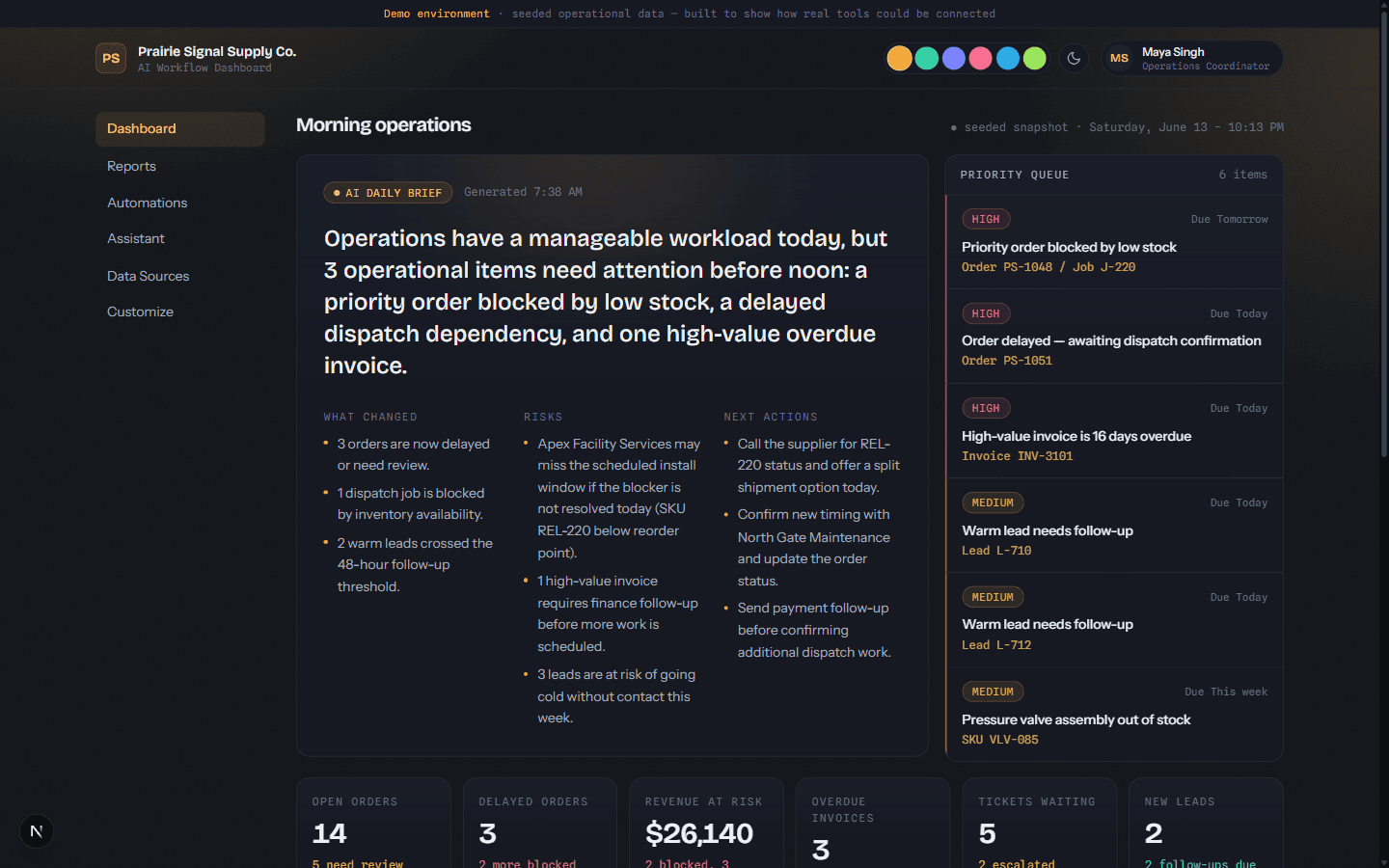
Prairie Signal Supply Co.
A dashboard connected to a data backend and an AI pipeline — surfacing daily status, priority signals, and readable summaries that would otherwise take an analyst’s morning to assemble by hand.
Dashboards pair naturally with automation systems and AI integrations — and more builds are on the work page. Need business dashboard development? Start here.
Straight answers, before you reach out.
What is a custom dashboard, exactly?
Why not just use spreadsheets or an off-the-shelf BI tool?
What data sources can it connect to?
Does the data update automatically?
Who maintains it after launch?
How much does a custom dashboard cost?
Let's build something that actually works.
Clear communication and practical digital systems for small businesses — built around real business goals and maintained as they change.