
Automation systems that run quietly in the background.
Most small businesses lose hours every week to work no one chose: routing inquiries, chasing follow-ups, retyping the same details into different tools. Armatir builds automation systems that take over those repetitive handoffs — reliably, and without asking you to adopt a giant platform.
Founder-led, based in Alberta, and available remotely. This is practical workflow improvement, not enterprise software: specific steps automated well, with people kept in control of the decisions.
Built for businesses where the admin never ends.
Most automation clients are small businesses and lean teams whose tools don't talk to each other — so people end up being the integration.
Businesses running on manual admin
The day starts and ends with the same routine: checking, forwarding, retyping, reminding. The work is necessary — doing it by hand is not.
Teams copying data between tools
Form responses into spreadsheets, emails into the CRM, job details into the calendar. Every copy is time spent and a chance for a typo.
Service businesses missing follow-ups
Inquiries answered late, quotes never chased, customers not updated — not from carelessness, but because nothing reminds anyone in time.
Founders who don’t want another platform
You want the repetitive work handled — not a heavyweight suite with per-seat pricing, a training course, and features you’ll never open.
Repetitive steps, removed for good.
Each of these is a real, buildable automation — a defined trigger and a defined action, wired into the tools you already use.
- Contact and lead intake
- New inquiries land in the right place automatically — recorded, acknowledged, and routed to whoever handles them, the moment they arrive.
- Notifications and follow-ups
- Reminders that actually fire: quote sent three days ago with no reply, job finished but not invoiced, customer waiting on an update.
- Form-to-task workflows
- A submitted form becomes a task, a calendar entry, or a job record — instead of an email someone has to remember to act on.
- CRM and spreadsheet updates
- Records created and kept current from the source — no more retyping the same customer details into three different places.
- Internal approvals and checkpoints
- Work that needs a sign-off pauses and asks for one. Work that doesn’t, flows through. Nothing stalls in someone’s inbox.
- Reporting summaries
- The weekly numbers assembled and delivered on schedule, instead of an hour of copy-paste every Friday afternoon.
- Dashboard data flow
- The feeds that keep a dashboard current — pulling from your tools on schedule so the picture is always up to date.
- AI-assisted steps where they earn it
- Where a workflow step involves reading or drafting — summarising an inquiry, preparing a reply — an AI step can slot in, with human review.
Practical automation, built to be trusted.
An automation you can't trust is worse than no automation. These are the rules every Armatir build follows.
Starts with the existing workflow
The automation is shaped around how your business already works — not the other way around. First the workflow is mapped, then the repetitive parts are removed.
You stay in control
Automations handle the predictable steps. Decisions, exceptions, and anything customer-sensitive stay with you, with clear points where a person takes over.
Built around your current tools
Wherever possible the system connects what you already use — inbox, forms, spreadsheets, CRM, calendar — rather than asking you to migrate to something new.
No unnecessary complexity
The right automation is often boring: a trigger, an action, a notification. Complexity is added only when the workflow genuinely demands it.
Clear failure states
Every automation answers the question "what happens when this fails?" before launch — errors surface to a person instead of disappearing silently.
Maintainable by design
Documented and handoff-ready, on the same foundation that can later carry AI integrations or custom dashboards without a rebuild.
From mapped workflow to running system, step by step.
The same disciplined process as every Armatir project, adapted to the questions automation work raises.
Map the workflow
A focused conversation about how work actually moves through your business — where it enters, who touches it, and where it slows down.
Identify the repetitive handoffs
The steps worth automating are picked deliberately: high-frequency, low-judgement, and currently done by hand.
Define triggers and actions
Each automation gets a precise definition — what starts it, what it does, who gets notified, and where a person steps in.
Build and test
The system is built against real examples and tested for edge cases and failure modes — reliability over cleverness.
Launch with documentation
You get a working system, documentation your team can follow, and maintenance guidance — with optional ongoing support if you want it.
What connected workflows can look like.
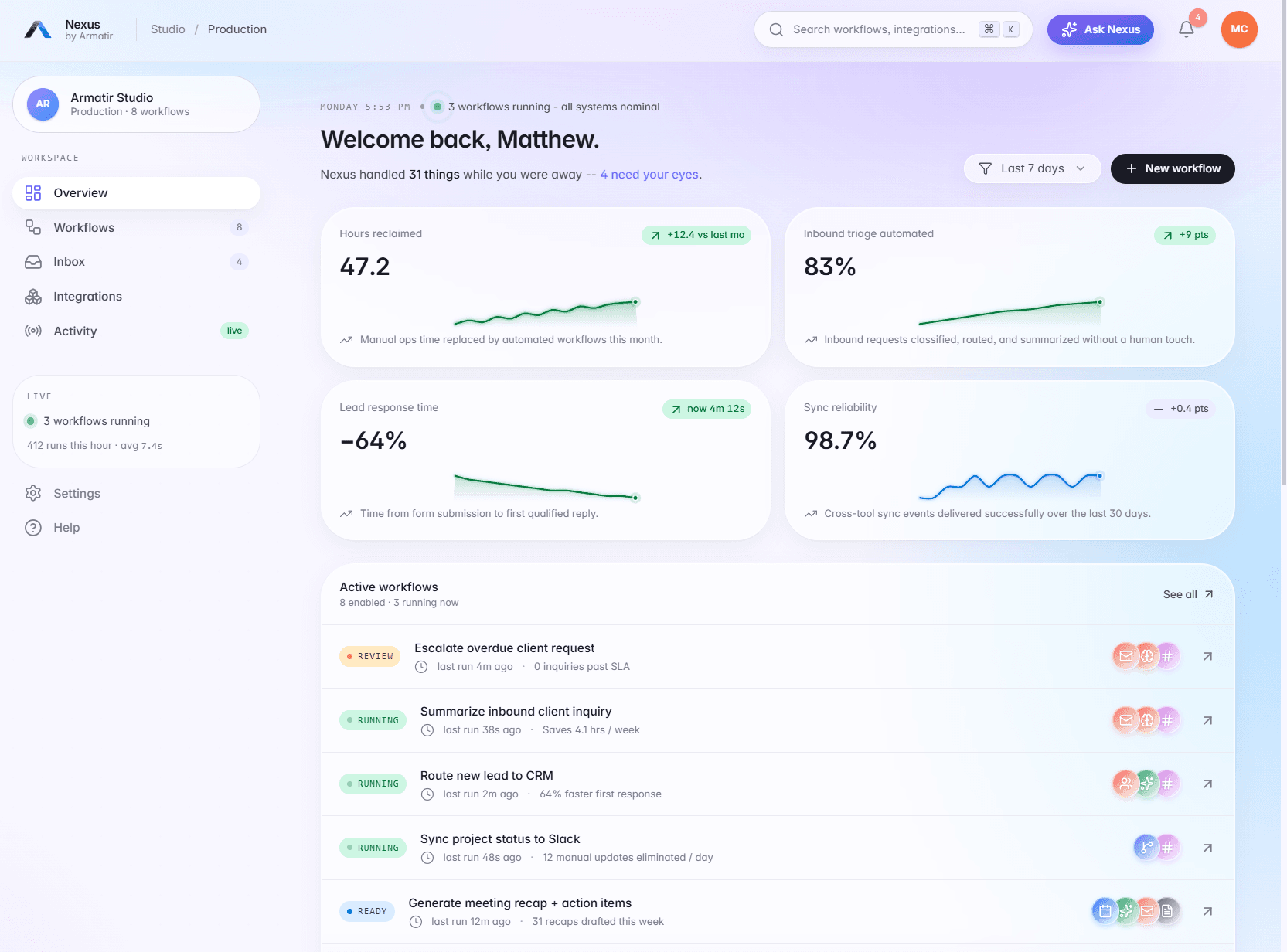
Armatir Nexus is an interactive demo — not client work — built to show how workflows, integrations, and live activity can sit together in one operational layer.
Armatir Nexus
A clickable product-style demo: workflow monitoring with run history and status states, an integration ecosystem view, and live activity — built to make the idea of automated, connected operations concrete.
Automation pairs naturally with AI integrations and custom dashboards — and more builds are on the work page.
Straight answers, before you reach out.
What is a business automation system?
What kinds of tasks can be automated?
Do I need new software first?
Can automation connect to my website or contact form?
What happens if an automation fails?
How much does a business automation system cost?
Let's build something that actually works.
Clear communication and practical digital systems for small businesses — built around real business goals and maintained as they change.