
AI integrations that do real work.
AI is useful when it is wired into the work your business already does — intake, triage, summaries, follow-ups, handoffs. Armatir builds practical AI integrations that take repetitive load off your team while keeping people in control of every decision that matters.
Founder-led, based in Alberta, and available remotely. This is business infrastructure, not hype: no promises that AI will run your company, just specific tasks done faster and more consistently.
Built for businesses where the busywork piles up.
Most AI integration clients are small businesses and lean teams — not companies with data science departments.
Businesses fielding repetitive inquiries
The same questions arrive by email, phone, and contact form every week — and answering them eats hours that should go to actual work.
Messy intake and handoffs
Information comes in through one channel, work happens somewhere else, and details get lost in the gap between them.
Teams copying data between tools
Form responses retyped into spreadsheets, emails summarised into the CRM by hand — manual glue work that software should be doing.
Founders who want AI without a platform
You want the leverage of AI on specific tasks — not another subscription suite your team has to learn, configure, and babysit.
Specific jobs, done by AI.
Each of these is a real, buildable integration — a defined task with defined inputs, wired into the tools you already use.
- AI-assisted contact and intake flows
- Forms and inquiries that arrive pre-summarised, categorised, and routed to the right place — instead of as raw text someone has to decode.
- Customer inquiry triage
- Incoming messages sorted by type and urgency, with suggested replies drafted for a human to review and send.
- Email and message drafting workflows
- First drafts of routine responses, follow-ups, and outreach — written in your tone, finished by you.
- Internal knowledge helpers
- Answers drawn from your own documents, policies, and past work — so the team stops re-asking and re-searching for the same things.
- Lead qualification support
- New inquiries checked against the signals that matter to you — budget, fit, urgency — and flagged accordingly.
- Dashboard and report summaries
- Plain-language summaries on top of your numbers, so the week’s status is readable at a glance instead of buried in rows.
- Form-to-workflow automation
- A submission triggers the actual work: records created, notifications sent, tasks assigned — with AI handling the messy unstructured parts.
- AI review layers on existing processes
- A second set of eyes on outgoing quotes, documents, or data entry — catching inconsistencies before they reach a customer.
Practical AI, with guardrails.
The difference between an AI integration that helps and one that creates new problems is discipline about scope, control, and data.
Starts with the workflow, not the model
The first question is never "where can we use AI?" — it is "where does your time actually go?" The integration is designed around that answer.
Humans stay in control
AI drafts, sorts, summarises, and suggests. People review and decide. Nothing customer-facing goes out without a human in the loop unless you explicitly want it to.
Clear boundaries
Each integration has a defined job with defined inputs and outputs. AI is not asked to make judgement calls it cannot verify.
Privacy-aware by design
What data flows to which service is mapped and agreed before anything is built — not discovered afterwards.
No unnecessary complexity
If a plain automation rule solves it, you get a plain automation rule. AI earns its place only where it genuinely outperforms simpler tools.
Built to be maintained
Documented, handoff-ready, and built on the same foundations as the rest of your stack — so it can grow into broader automation or custom dashboards later without a rebuild.
From workflow to working integration, step by step.
The same disciplined process as every Armatir project, adapted to the questions AI work raises.
Identify the workflow
A focused conversation about where time and information actually move through your business — and which steps are worth improving first.
Define what AI should and should not do
Boundaries are set up front: what the AI handles, what stays with people, and what data it is allowed to touch.
Connect the tools
Website, inbox, forms, CRM, documents — the integration is wired into what you already use rather than replacing it.
Test outputs and edge cases
Real examples, odd inputs, and failure modes are tested before launch — accuracy and predictable behavior over impressive demos.
Launch with a maintainable setup
Documentation, a clean handoff, and optional ongoing support — a system your team can run and adjust without depending on me.
What an AI-connected system can feel like.
Armatir Nexus is an interactive demo — not client work — built to show how AI triage, workflows, integrations, and live activity can sit together in one operational layer.
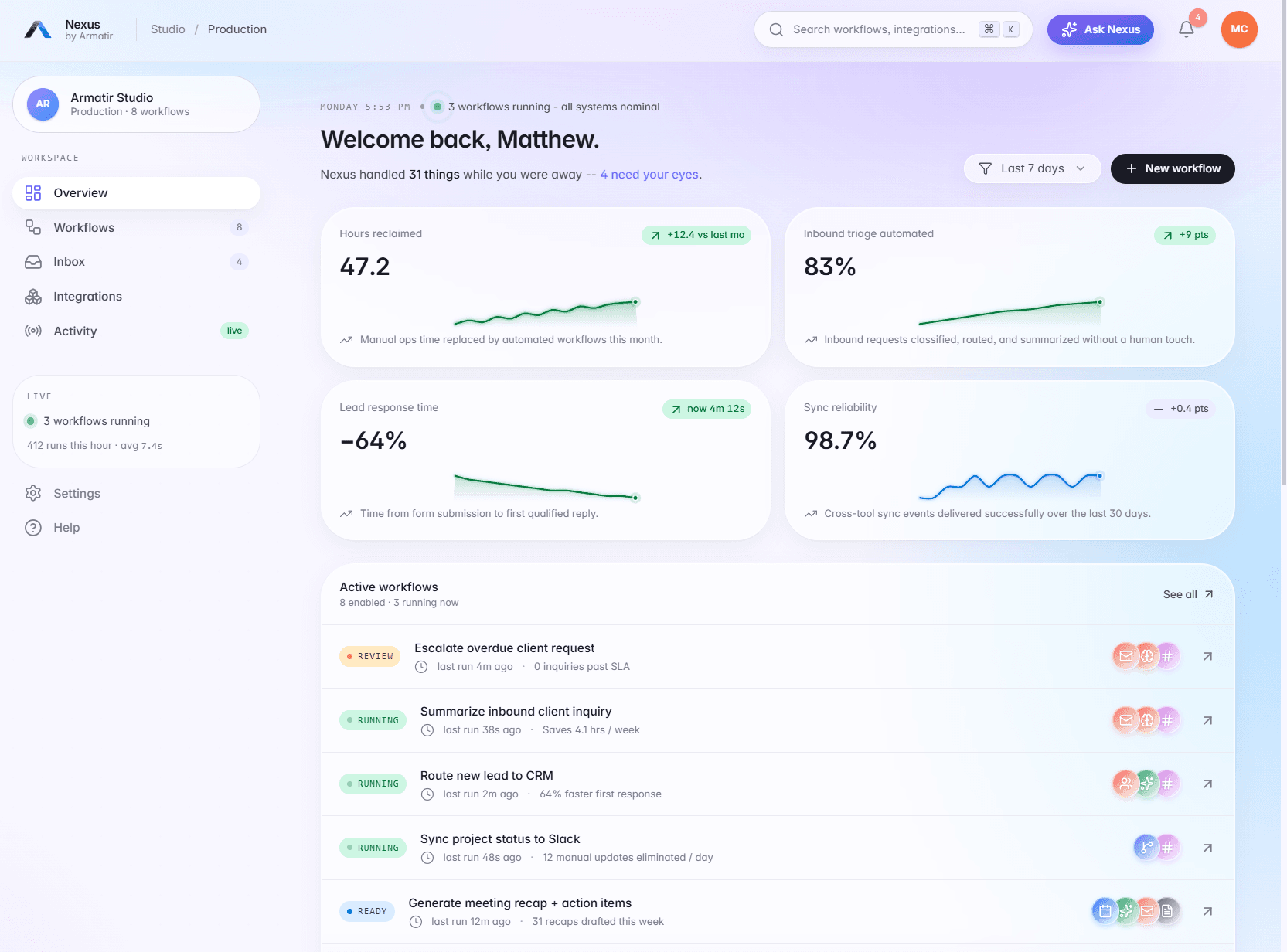
Armatir Nexus
A clickable product-style demo: inbox triage, workflow monitoring, an AI command center, and integration views in one interface — built to make the idea of a connected operational layer concrete.
More builds — including an AI-powered reporting dashboard demo — are on the work page. Searching specifically for an AI automation consultant in Canada? Start here.
Straight answers, before you reach out.
What does an "AI integration" actually mean?
Do I need custom software first?
Can AI connect to my website or contact form?
Will this replace my current tools?
How do you keep AI from making mistakes?
How much does an AI integration cost?
Let's build something that actually works.
Clear communication and practical digital systems for small businesses — built around real business goals and maintained as they change.